


Lost Your Volunteer Signup Link? PlanHero Makes It Easy to Find an Event!
Introducing Find an Event — a simple, convenient way to locate volunteer opportunities using an Event Organizer’s email address.
We’ve all been there. You signed up to help with the school carnival, community fundraiser, food pantry, or neighborhood event. But now you can’t find the original signup link.
Was it in an email? A text message? Somewhere in that 47-message group chat?
Good news! PlanHero’s new Find an Event feature makes it easy to locate an Event without digging through old messages or asking the organizer to send the link again.
And, as always with PlanHero, no app download is required.
What Is Find an Event?
Find an Event is a new search feature that allows volunteers and participants to locate publicly discoverable PlanHero Events by entering an Event Organizer’s email address.
Instead of needing the original signup link, you simply enter the email address of the person organizing the Event.
PlanHero displays the Events associated with that organizer that have been made available for discovery.
It’s that easy!
How to Find an Event on PlanHero
Looking for a volunteer signup? Here’s how to find it.
Step 1: Open Find an Event
Visit PlanHero’s website and select Find an Event from the navigation menu.

Step 2: Enter the Organizer’s Email Address
Enter the email address of the person who organized the Event.
For example, if your school’s volunteer coordinator uses volunteers@school.org, enter that complete email address.
Important: You’ll need the organizer’s exact email address. Searching by a person’s name, school name, or organization name isn’t supported.
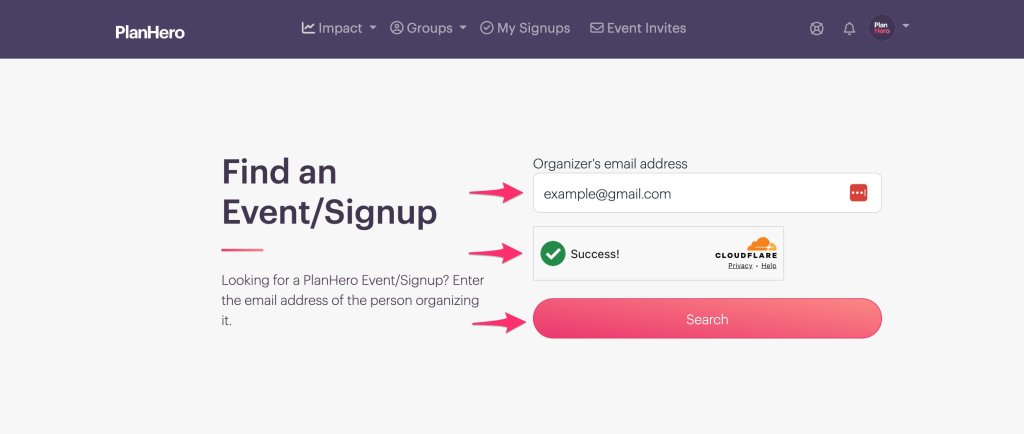
Step 3: Complete the Security Verification
Complete the quick CAPTCHA verification to confirm you’re a real person.
This helps protect organizers and their Events from automated searches.
Step 4: Click Search (if needed)
Select Search to see available Events associated with that organizer’s email address.
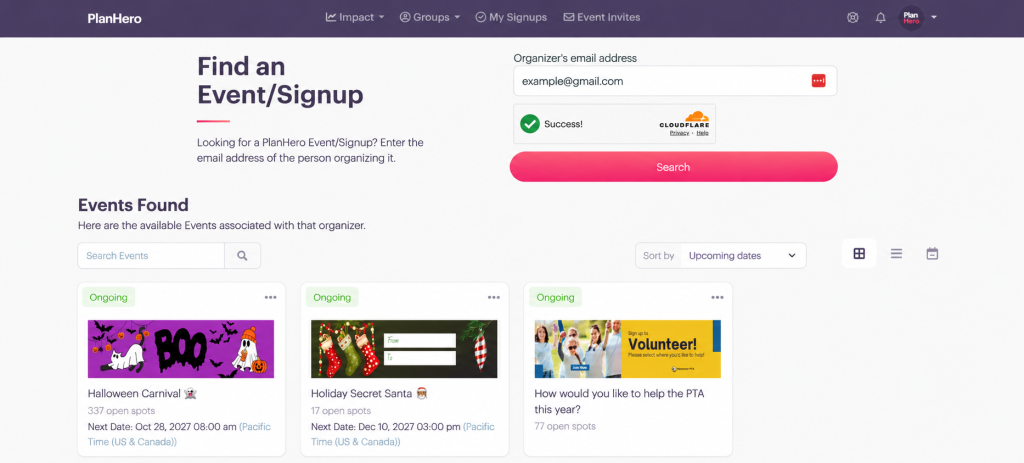
If the organizer has multiple discoverable Events, you’ll see the available matches.
Step 5: Select Your Event
Find the Event you’re looking for and click it.
You’ll be taken to the Event’s normal PlanHero page, where you can review available opportunities and sign up.
No PlanHero account or app download is required to use the search feature.
For Event Organizers: Make Your Events Easier to Find
Find an Event isn’t just convenient for volunteers. It also helps Event Organizers spend less time answering messages like:
“Can you send me that signup link again?”
When your Event is discoverable, participants who know your organizer email address can locate it themselves.
How to Make Your Event Discoverable
- Open your Event in PlanHero.
- Go to Event Settings.

3. Scroll down to the Public Group Page heading and enable Allow people to find this Event by searching an Organizer’s email address.

Once enabled, your eligible published Event can appear when someone searches using the exact email address of an authorized Event Organizer.
Tip: If your Event has multiple Co-Event Organizers, participants can also find it using an authorized Co-Event Organizer’s email address.
You can continue sharing your regular Event link and QR code, too. Find an Event simply provides another way for participants to get where they need to go.
What About Privacy?
We’re glad you asked!
At PlanHero, making Events easier to find should never mean making private information easier to access.
That’s why Find an Event includes several important safeguards:
- Exact email searches only. People can’t browse PlanHero accounts, search by partial email addresses, or search for organizers by name.
- Organizer-controlled discoverability. Organizers can choose whether their eligible Events appear in search results.
- Private Events stay private. Find an Event doesn’t override existing Event privacy settings or access restrictions.
- No participant information is exposed. Search results don’t reveal volunteer names, Member profiles, or other private account information.
- Security verification and search protections. CAPTCHA and rate limiting help prevent automated searches and misuse.
If an Event isn’t discoverable, it won’t appear in search results. Participants can still access it through the Event link provided by the organizer, subject to its normal access requirements.
What If You Can’t Find Your Event?
If your search doesn’t return any available Events, double-check that you’ve entered the organizer’s correct email address.
There are several possible reasons an Event might not appear:
- The organizer has chosen not to make the Event discoverable.
- The Event hasn’t been published or is no longer available.
- The email address doesn’t match an authorized Event Organizer.
If you’re still having trouble, contact your Event Organizer and ask for the direct signup link.
One Less Link to Keep Track Of!
Between school activities, nonprofit events, community projects, and volunteer commitments, there’s already plenty to keep organized.
PlanHero’s new Find an Event feature is one more way we’re making volunteer coordination easier for everyone.
Whether you’re organizing a school fundraiser or volunteering at your local food pantry, finding the right Event shouldn’t be the hard part.
Looking for an Event?
Visit PlanHero and select Find an Event to get started.
And if you’re organizing Events, make sure your discoverability settings are configured so your volunteers can find you!
PlanHero — Modern, ad-free volunteer signups. No app required.
