


Sometimes you know exactly what you need to tell your volunteers or participants — you just don’t want to send it right now.
With PlanHero’s new Schedule Message feature, you can create a message today and choose the date and time you want it delivered.
That means you can prepare volunteer reminders before the week gets busy, schedule important instructions to arrive the morning of an event, or write your post-event thank-you while everything is still fresh — and let PlanHero take care of sending it at the right time.
Can You Schedule Volunteer Emails and Text Messages in Advance?
Yes. PlanHero lets organizers schedule volunteer communications in advance, including email messages, text messages, or both.
Depending on your PlanHero plan and available messaging options, you can schedule communications to be sent:
- Via Email
- Via Text
- Via Email and Text
You choose the recipients, create your message just as you normally would, and tell PlanHero when you want it sent.
How to Schedule a Message
1. Create Your Message
Open Messages for your Event and select New Conversation. (NOTE: You can also do this via Group Message and for Impact Plan subscribers, via Account Message.)
Choose your recipients, enter your subject, and compose your message.
You can use the same formatting and messaging options you normally use when sending a PlanHero message.
2. Select “Schedule for later”
Instead of sending your message immediately, check the Schedule for later box.
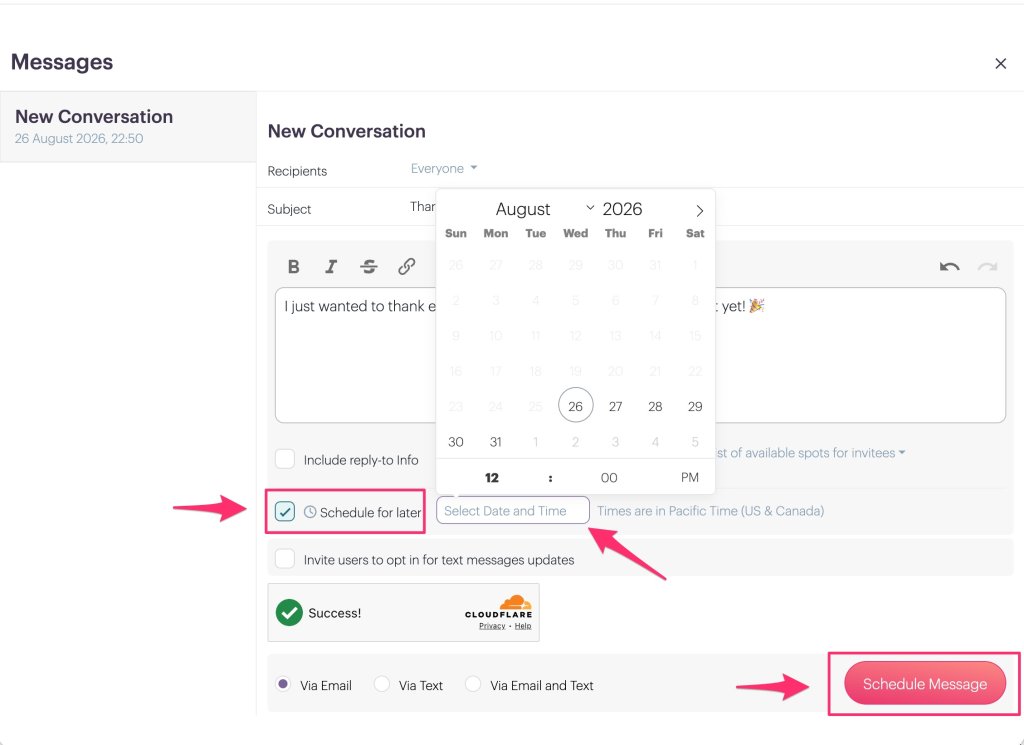
Click Select Date and Time to open the scheduling calendar.
3. Choose the Date and Time
Select the date and exact time you want your message delivered.
PlanHero displays the applicable time zone next to the scheduling field, so be sure to take that into account when selecting your delivery time. Your time zone is set in your My Account settings.
Once everything looks right, click Schedule Message.
That’s it. Your message is now queued to be sent automatically at the date and time you selected.
Need to Make a Change?
Plans change. Messages sometimes need to change with them.
After scheduling a message, you’ll see it displayed in the conversation along with its scheduled delivery date and time.
Until the message is sent, you can select Edit to make changes to the message or its scheduled delivery time.

You can also select Cancel if you decide the message should not be sent at all.
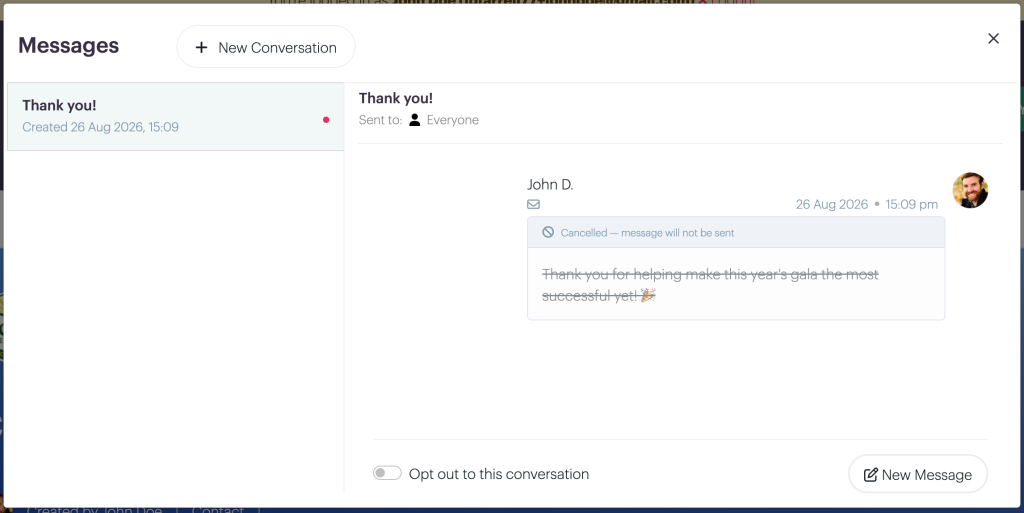
When a scheduled message is cancelled, PlanHero keeps it in the conversation history and clearly marks it:
Cancelled — message will not be sent
That way, you still have a record of the communication without wondering whether it went out.
Put Your Volunteer Communications on Autopilot
There are plenty of times when scheduling a message can make life easier.
You might schedule:
- Parking and check-in instructions the morning of an event
- An update to organizers before an important deadline
- A text message shortly before volunteers are expected to arrive
- A thank-you message for the morning after your event
- A reminder about what to wear or having one’s hair pulled back if dealing with food
- A year-end thank to all of your participants from all of your events
You can prepare those communications when you have the time rather than having to remember to send each one later.
For busy volunteer organizers, that’s one less thing to keep on the mental to-do list.
Plan Ahead. PlanHero Will Send It Later.
Whether you’re organizing a school fundraiser, nonprofit event, recurring volunteer shifts, a faith-based event, or any other activity that depends on keeping people informed, good communication matters.
Now you can get those messages ready ahead of time — and let PlanHero handle the timing.
Create your message. Choose when it should go out. Get back to everything else.
Frequently Asked Questions
Can I schedule a message to volunteers in advance?
Yes. PlanHero allows organizers to create a message and schedule it to be sent automatically at a future date and time. This can be especially helpful for volunteer reminders, event instructions, updates, and post-event thank-you messages.
Can I schedule both email and text messages?
Yes. Depending on your PlanHero plan and messaging options, messages can be scheduled for delivery via email, text message, or both email and text.
Can I change a PlanHero message after I schedule it?
Yes. A scheduled message can be edited before it is sent. You can update the message or change its scheduled delivery date and time.
Can I cancel a scheduled message?
Yes. You can cancel a scheduled PlanHero message before it is sent. The cancelled message remains visible in the conversation history and is marked “Cancelled — message will not be sent.”
What kinds of volunteer messages can I schedule?
Organizers can schedule messages such as event-day instructions, parking or check-in information, deadline reminders, schedule updates, and post-event thank-you messages.
Why schedule volunteer communications in advance?
Scheduling volunteer communications lets organizers prepare important messages when they have time and have PlanHero automatically deliver them later. It can reduce last-minute work while helping volunteers receive information when it is most useful.
