


Simple, Flexible Event Check-Ins & Check-Outs with PlanHero
Whether you’re managing volunteers, staff, parents, students, or event attendees, keeping attendance organized matters.
That’s why PlanHero’s Event Check-In and Check-Out tools are designed to make the process fast, flexible, and stress-free for both organizers and participants.
Control When Participants Can Check In
Every event is different.
Some organizations want participants checking in 10 minutes early. Others may want a larger arrival window for setup, parking, or orientation.
With PlanHero, Admins and Co-Organizers can define exactly how many minutes before a participant’s scheduled shift or time spot they’re allowed to check in.
This helps events stay organized while still giving participants flexibility.
Fast QR Code Check-Ins
PlanHero makes self-service event attendance incredibly easy with downloadable QR codes for both check-in and check-out.
Admins and Co-Organizers can:
– Download a check-in / check-out QR code
– Display the QR code for scanning on an iPad, tablet, laptop, or monitor at a check-in station
– Print the QR codes for participants to scan using their own mobile devices
Participants simply scan the code and check in or out within seconds.
No paper sign-in sheets.
No messy spreadsheets.
No time-consuming transposing of info from paper to digital.
No confusion.
Just a smooth, modern check-in experience.
Perfect for On-Site Check-In Stations
Many organizations choose to display their QR codes at a central check-in station using an iPad or tablet.
Others prefer printing the QR code and placing it at entrances, classrooms, volunteer stations, or event tables.
Either way, participants can quickly access their check-in or check-out process right from their own phone by entering the email address they used when signing up.
Manual Organizer Check-Ins
Need additional flexibility?
Admins and Co-Organizers can also manually check participants in or out directly from their own device.
This works great for:
– Participants without smartphones
– Assisted check-in environments
– Large events with volunteers arriving in groups
– Schools, churches, and nonprofits that prefer organizer-managed attendance
Organizers can manage attendance from:
– Laptops
– Tablets
– Mobile devices
Easily Correct Attendance Records After the Event
Real life happens.
Someone forgets to check out.
A volunteer arrives late, but forgets to check in.
No problem.
After the event, Admins and Co-Organizers can edit participant check-in and check-out times to ensure records remain accurate.
This is especially helpful for organizations tracking:
– Volunteer hours
– Staff participation
– Parent service commitments
– Event attendance
– Time-based reporting
Built for Modern Organizations
From nonprofits and schools to churches and community organizations and business CSR programs, PlanHero’s check-in and check-out tools help streamline attendance management while creating a better experience for everyone involved.
Because managing people shouldn’t feel complicated.
How It Works: Enable Check-ins for an Event
The Check-in feature is available in our PlanHero Impact Plan.
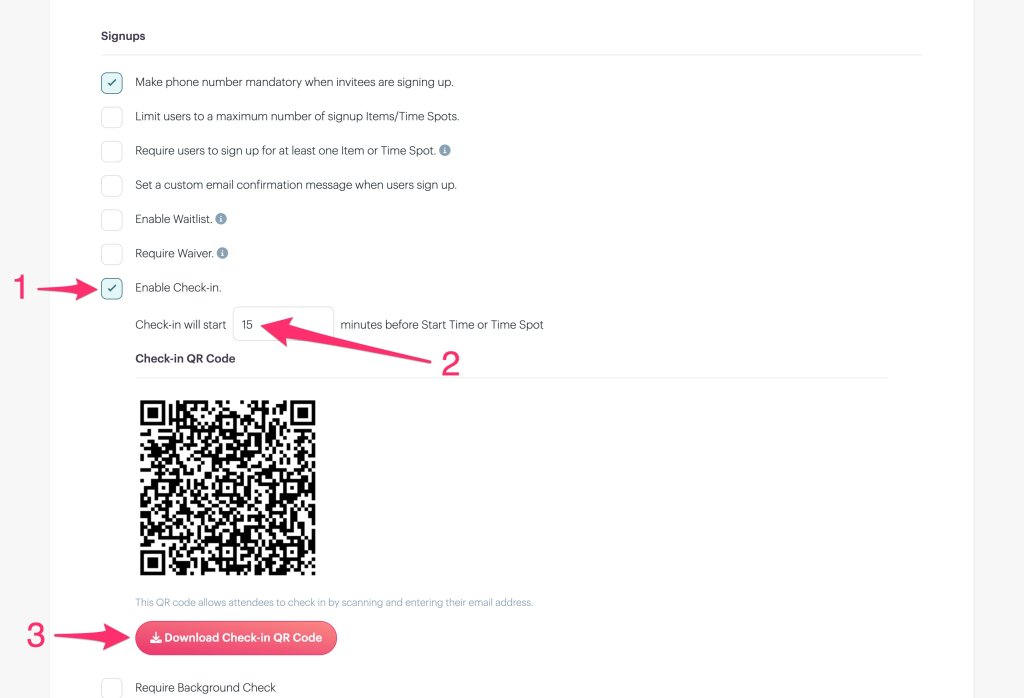
Click Event Settings

1. Check the Enable Check-in box.
2. Enter the amount of time before a the Event Start Time or the Time Spot that a participant is allowed to checked.
3. If you’re allowing participants to self-check-in, download the Check-in QR Code. You can either print the QR code and have it readily available on paper or a poster for self-checking in with a mobile device; or you can upload it to a screen that you will display digitally (e.g. on a tablet) at a check-in station.
Participant Check-in
Participants use their mobile device camera to scan the Event Check-in QR Code.
Next, they enter the email address that they used to sign up.

After entering their email address, they will see all of their signups. Scroll to the shift that they want to Check-in for and click Check In.

A status bar message will indicate that the participant has successfully checked in. Note that the button now changes to Check Out.

If the participant Checks Out (e.g. they need to go pick up a child in the middle of their shift), they can then click on Check In Again when they return.

What is someone forgets to Check-in?
No problem!
Admins and co-organizers can manually Check-in people by going to the Event page, finding the participant’s name and then clicking the + Add Check-in button.

Adjusts times as needed, then click the Add Check-in button.

What is someone forgets to Check-out?
Also, not a problem!
Click on the Check-ins tab.

Scroll to the desired date, then select the Time Spot you wish to view.

