


Not every volunteer opportunity comes with a signup sheet. But every volunteer hour deserves to count!
Whether someone spends an afternoon organizing donations, helps with administrative tasks from home, or puts in a few hours maintaining a community garden, those contributions matter.
That’s why we’re excited to introduce Manual Hours Logging, available with the PlanHero® Impact Plan!
Now, administrators can manually record volunteer hours for their Members. And, when administrators enable the option, Members can log their own hours, too.
It’s another way PlanHero helps organizations keep track of the time and effort their volunteers contribute—even when those activities happen outside a scheduled PlanHero Event.
Why Manual Hours Logging Matters
Many organizations rely on volunteers for activities that don’t necessarily require a formal Event or signup.
Think about:
- Nonprofits: Volunteers sorting donations, making deliveries, or helping with administrative projects.
- Schools and PTAs/PTOs: Parents preparing classroom materials, working on fundraising projects, or completing tasks from home.
- Faith Organizations: Members providing community outreach, maintaining facilities, or assisting with ongoing ministries.
- Community Groups: Volunteers cleaning up parks, maintaining gardens, or organizing neighborhood initiatives.
- HOAs: Residents contributing time to landscaping, neighborhood improvements, or community projects.
These contributions can add up to hundreds—or even thousands—of volunteer hours over the course of a year.
With Manual Hours Logging, organizations can capture those contributions alongside their other volunteer activity in PlanHero.
Two Ways to Log Volunteer Hours
1. Administrators Can Add Hours for Members
Organization administrators can record volunteer hours directly from a Member’s profile.
It’s a simple way to capture volunteer contributions that weren’t associated with a scheduled Event.
How it works:
- Navigate to the Member’s profile in PlanHero.
- Under the Actions column, click on the three dots associated with the Member’s profile.
- Click on Edit.
- Locate the Manual Hours Log section.
- Click + Add Hours.
- Enter the number of hours and minutes volunteered.
- Select the date the work was performed.
- Enter the Project / Activity description.
- Click Save.
That’s it! The volunteer hours are recorded and associated with that Member.
For example, if a volunteer spent two hours and thirty minutes sorting donations at a food pantry, an administrator could record:
Hours: 2
Minutes: 30
Date Worked: November 5, 2026
Project / Activity: Food Pantry Donation Sorting
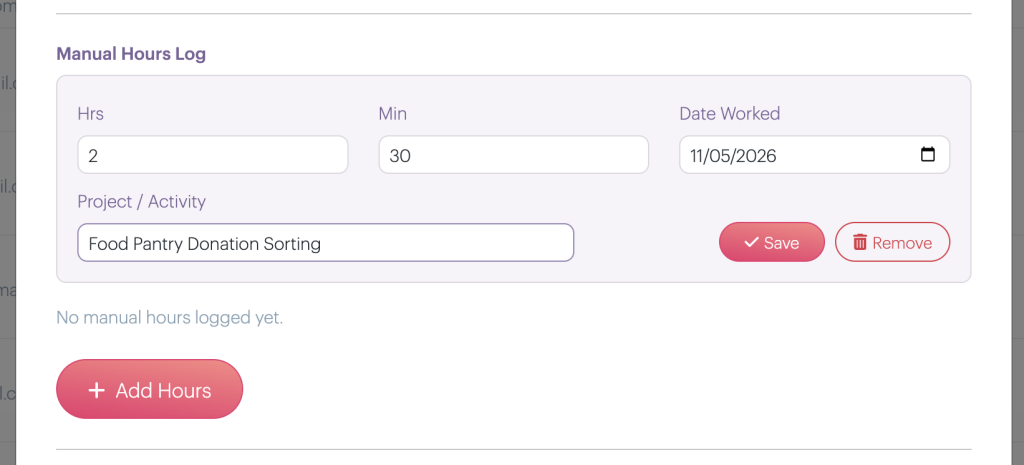
After clicking the SAVE button:

The contribution is now part of that Member’s volunteer-hours record.
2. Members Can Log Their Own Hours (When Permitted)
Sometimes, the easiest way to capture volunteer contributions is to let volunteers record their own time.
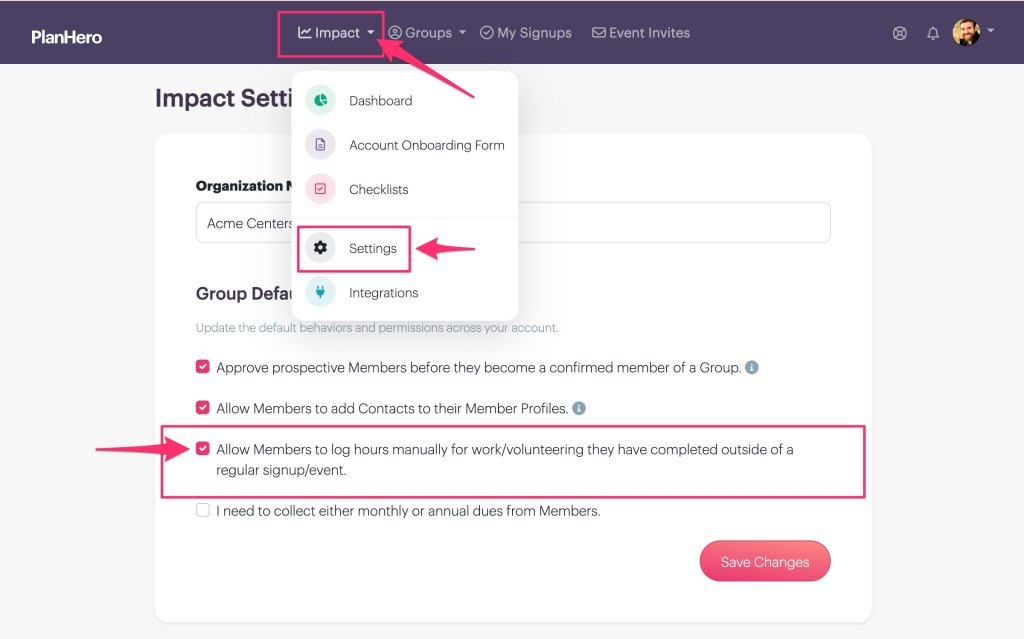
With PlanHero’s Impact Plan, administrators can choose whether Members are permitted to add their own manual volunteer hours.
When this permission is enabled, Members can record their volunteer activities without requiring an administrator to enter every contribution on their behalf.
This is especially helpful for organizations with volunteers who work independently, participate in ongoing projects, or complete tasks outside scheduled Events.
Administrators remain in control of whether Members have access to this capability.
This control is managed via the Impact Settings.
What Information Can Be Recorded?
Each manual volunteer-hours entry includes:
Hours and Minutes
Record the amount of time contributed, whether it’s 30 minutes or several hours.
Date Worked
Specify when the volunteer activity took place.
Project / Activity
Add a description of the work performed, such as “Community Garden Cleanup,” “Fundraising Preparation,” or “Food Pantry Inventory.”
These details help organizations maintain meaningful records of volunteer contributions.
Keep Volunteer Contributions Connected to Your Members
One of the biggest advantages of Manual Hours Logging is that volunteer contributions are associated directly with individual Member records.
Rather than maintaining separate spreadsheets, paper timesheets, or scattered email reports, organizations can keep track of volunteer activity within PlanHero.
This makes it easier to understand how Members contribute to an organization’s mission, including activities that don’t require a formal Event signup.
And because Manual Hours Logging is part of the Impact Plan, it complements PlanHero’s existing volunteer management capabilities, including Event scheduling, Member management, check-ins and check-outs, and volunteer-hours reporting.
Less Administrative Work. More Complete Volunteer Records.
Volunteer hours are valuable.
They help organizations understand volunteer engagement, recognize contributions, and demonstrate the tremendous amount of work their communities accomplish.
But tracking those hours shouldn’t become another full-time job.
By allowing administrators—and optionally Members themselves—to record volunteer hours manually, PlanHero makes it easier to capture the contributions that might otherwise go unrecorded.
Because volunteering doesn’t always happen on a schedule. And the hours still count!
Available with the PlanHero Impact Plan
Manual Hours Logging is available as part of the PlanHero Impact Plan, our comprehensive solution for organizations that need more than basic volunteer signups.
From managing Members and tracking volunteer hours to collecting dues, managing waivers, and coordinating volunteer activities, Impact brings your organization’s volunteer and member management tools together in one place.
Ready to make every volunteer hour count?
Explore the PlanHero Impact Plan and discover a smarter, more flexible way to manage your volunteers.

