


NEW! PlanHero now integrates with Smartwaiver, giving organizations another powerful way to collect digital signatures, manage liability waivers, and simplify volunteer and Member management.
Whether you’re onboarding new Members, coordinating volunteers for an upcoming Event, or managing ongoing activities, collecting signed waivers is often an essential part of running your organization.
That’s why we’re excited to introduce our new integration with Smartwaiver, available with the PlanHero Impact Plan!
Organizations can now connect their Smartwaiver accounts directly to PlanHero and incorporate their existing Smartwaiver templates into two important workflows:
- Member Onboarding Forms: Require new Members to complete a Smartwaiver as part of joining your organization.
- Event Signups: Require volunteers and other participants to complete a Smartwaiver when registering for an Event.
PlanHero tracks waiver completion, helping organizers manage participation requirements without manually comparing signup lists against signed waiver records.
And because Smartwaiver is integrated directly into PlanHero, your organization can continue managing Members, volunteers, and Events in one place.
Two Ways to Manage Waivers in PlanHero
PlanHero already offers built-in Waivers & Agreements as part of our Impact Plan.
With this feature, organizations can create agreements directly in PlanHero or upload existing PDF documents, then require participants to electronically sign or acknowledge them during Member onboarding or Event signup.
You can learn more about these features in our original article:
** Introducing Waivers & Agreements in the PlanHero Impact Plan**
Now, with the addition of Smartwaiver, organizations have another option.
Option 1: PlanHero’s Built-In Waivers & Agreements
Ideal for organizations that want a straightforward way to collect electronic signatures and acknowledgments without subscribing to an additional service.
Organizations can create and manage their agreements within PlanHero and incorporate them into Member Onboarding Forms and Event Signups.
Option 2: Smartwaiver Integration
Ideal for organizations that already use Smartwaiver or prefer a dedicated digital waiver platform.
With the integration, organizations can:
- Connect their existing Smartwaiver account to PlanHero.
- Use Smartwaiver templates they’ve already created.
- Require Smartwaiver signatures during Member onboarding.
- Require Smartwaiver signatures during Event signup.
- Track waiver completion through PlanHero.
- Prevent Event check-in until required waivers have been signed.
The choice is yours! Both options are available through the PlanHero Impact Plan, allowing organizations to select the waiver system that best meets their needs.
One Integration. Two Important Workflows.
One of the biggest advantages of PlanHero’s Smartwaiver integration is its flexibility.
Organizations can use Smartwaiver for Member onboarding, Event participation, or both.
1. Smartwaiver for Member Onboarding
Many organizations require new Members to complete certain paperwork before participating in activities.
For example, a school parent organization might require Members to sign a liability waiver before volunteering on campus. A nonprofit might require a general participation agreement, while a community organization might require an acknowledgment of its policies.
With PlanHero’s Smartwaiver integration, organizations can include a required Smartwaiver in their Member Onboarding Forms.
When someone completes the onboarding process, they can be directed to the appropriate Smartwaiver template to provide their electronic signature.
PlanHero tracks the waiver’s completion status as part of the onboarding process.
This helps organizations collect required documentation as Members join, rather than having to follow up individually afterward.
Example:
A school PTA requires all parent volunteers to sign an annual liability waiver.
The PTA creates its waiver in Smartwaiver and connects Smartwaiver to PlanHero.
When parents complete the PTA’s Member Onboarding Form, they are prompted to sign the required waiver.
The organization can then track which Members have completed this requirement.
2. Smartwaiver for Event Signups
Not every organization requires Members to complete onboarding, and not every volunteer is necessarily a Member.
That’s where Event-level waivers come in.
With PlanHero’s Smartwaiver integration, Event Organizers can select a specific Smartwaiver template for an Event and require participants to sign it as part of the signup process.
For example:
- A nonprofit hosting a fundraising gala may require volunteers to sign a general liability waiver.
- A school organizing a field trip may require a participation agreement.
- An animal rescue organization may require volunteers to acknowledge the risks associated with handling animals.
- A community group organizing an outdoor cleanup may require a waiver covering physical activities.
Each Event can use the Smartwaiver template appropriate for its activities.
And when a waiver is required, PlanHero can prevent participants from checking in until the waiver has been signed.
This gives organizers an additional way to manage participation requirements without manually reviewing paperwork at the registration table.
How to Connect Smartwaiver to PlanHero
Getting started is straightforward.
You’ll need an active Smartwaiver account and a PlanHero Impact Plan subscription.
Step 1: Create Your Smartwaiver API Key
First, log in to your Smartwaiver account.
Navigate to:
My Account → API Keys → Create New API Key
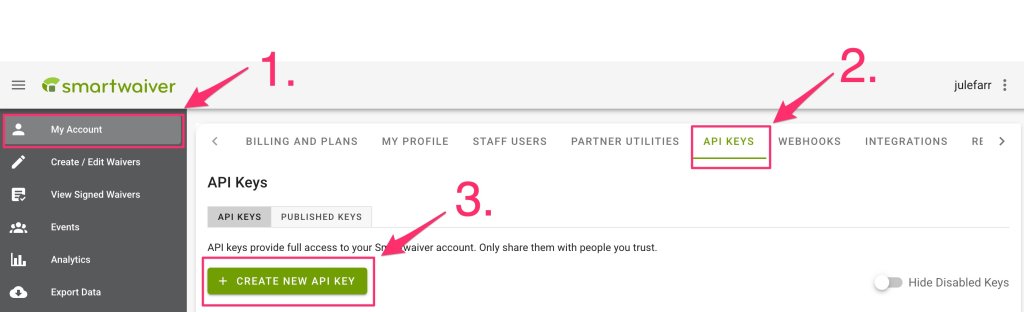
You’ll be prompted to create a new API key.
Enter a descriptive name, such as PlanHero, so you can easily identify the key later.
Under API Key Permissions, ensure the permissions required for the integration are enabled.
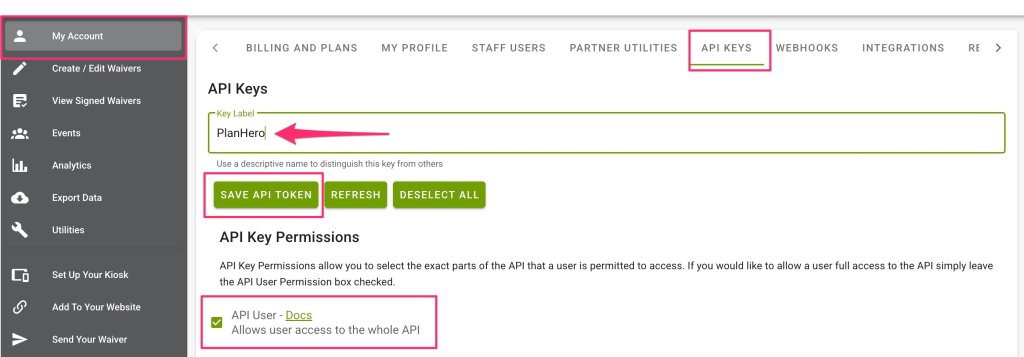
Click Save API Token.
Important: Save Your API Key!
Smartwaiver will display your newly generated API key.
You will only be able to view this key once, so be sure to copy it before leaving the page.
Click Copy Key and keep it somewhere secure until you’re ready to connect your account to PlanHero.
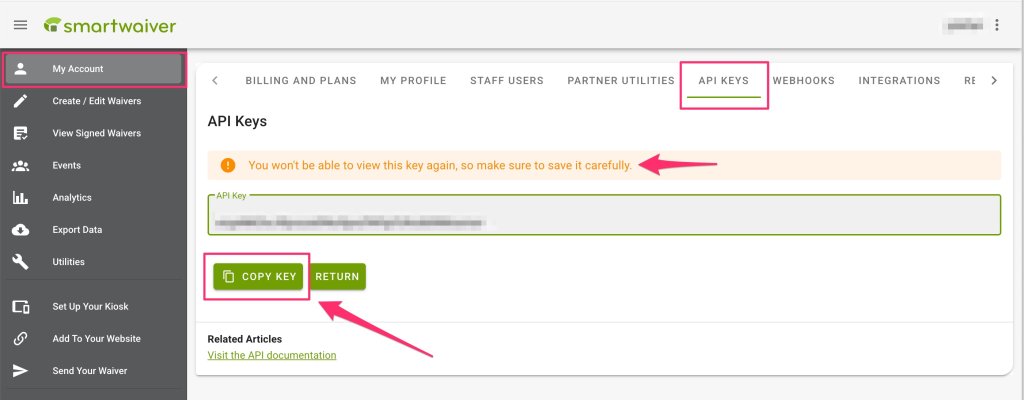
Security tip: Your Smartwaiver API key provides access to your Smartwaiver account. Treat it like a password and never share it publicly.
Step 2: Connect Smartwaiver to Your PlanHero Account
Next, log in to your PlanHero account.
From your Impact Plan dashboard, navigate to:
Impact → Integrations
NOTE: You’ll need to be the Account Owner to access the Impact → Integrations dashboard and selection.
Find Smartwaiver in the list of available integrations.
Expand the Smartwaiver section, enter the API key you generated, and click Connect.

Once the connection is successful, PlanHero will display a green Connected status next to Smartwaiver.
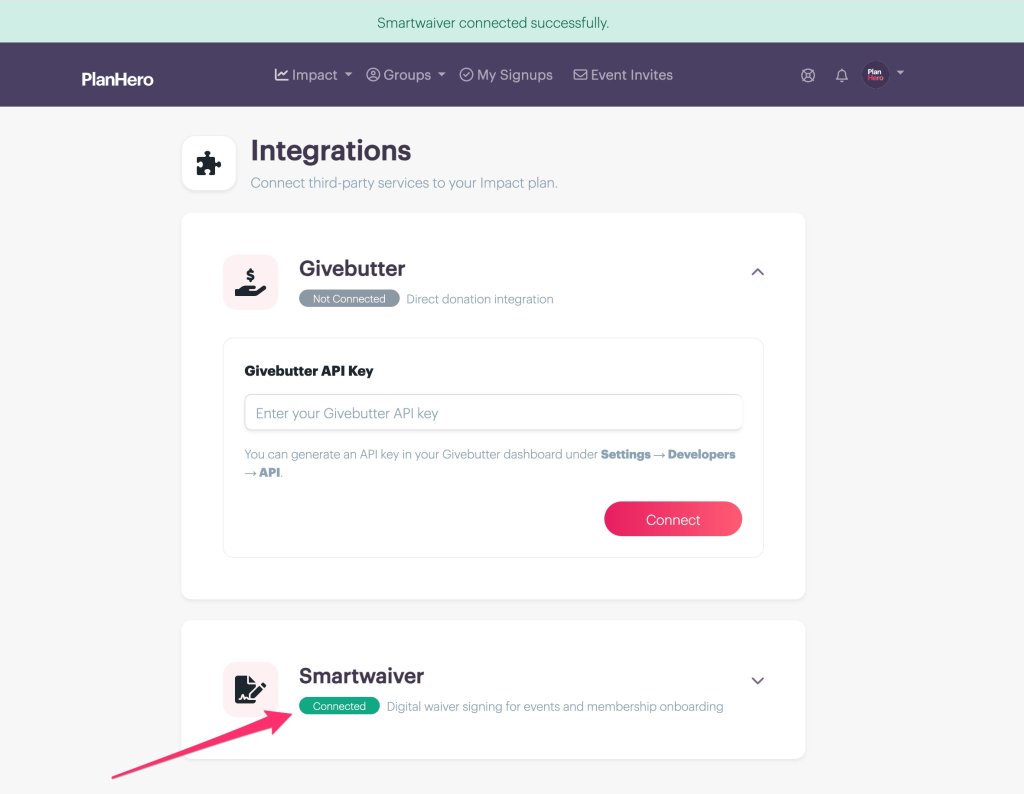
That’s it! Your Smartwaiver account is now connected to PlanHero.
You can begin using your Smartwaiver templates in Member Onboarding Forms and Events.
How to Use Smartwaiver in Member Onboarding Forms
If your organization uses PlanHero’s Member Onboarding Forms, you can incorporate Smartwaiver into the onboarding process.
This is particularly useful for organizations that require Members to complete liability waivers, participation agreements, or other signed documents when joining.
Step 3A: Open Your Member Onboarding Form
From your PlanHero Impact Plan dashboard, navigate to the Member Onboarding Form you want to configure.
Open the form’s waiver settings.
Enable the waiver requirement and select Smartwaiver as the waiver system.
Step 4A: Select Your Smartwaiver Template
Once Smartwaiver is selected, choose the appropriate waiver template from your connected Smartwaiver account.
For example, a school parent organization might select a template called:
Annual Parent Volunteer Liability Waiver
Save your changes.
Your Member Onboarding Form is now configured to use the selected Smartwaiver template.
Step 5A: Members Complete Their Waiver During Onboarding
When new Members complete your organization’s onboarding process, they’ll be prompted to open and sign the required Smartwaiver.
PlanHero tracks whether the waiver has been completed, helping administrators manage this important onboarding requirement.
This is especially helpful for organizations with large or frequently changing memberships.
Rather than distributing separate waiver links and manually tracking responses, organizations can incorporate the requirement into their existing Member onboarding process.
How to Use Smartwaiver for Event Signups
You can also assign Smartwaiver templates directly to individual PlanHero Events.
This is useful for organizations that allow both Members and non-Members to participate, or that require different waivers for different activities.
Step 3B: Open Your Event Settings
Open the Event where you want to require a waiver.
Select the Settings tab and scroll down to the Signups section.
Locate the Require Waiver option and check the box to enable it.
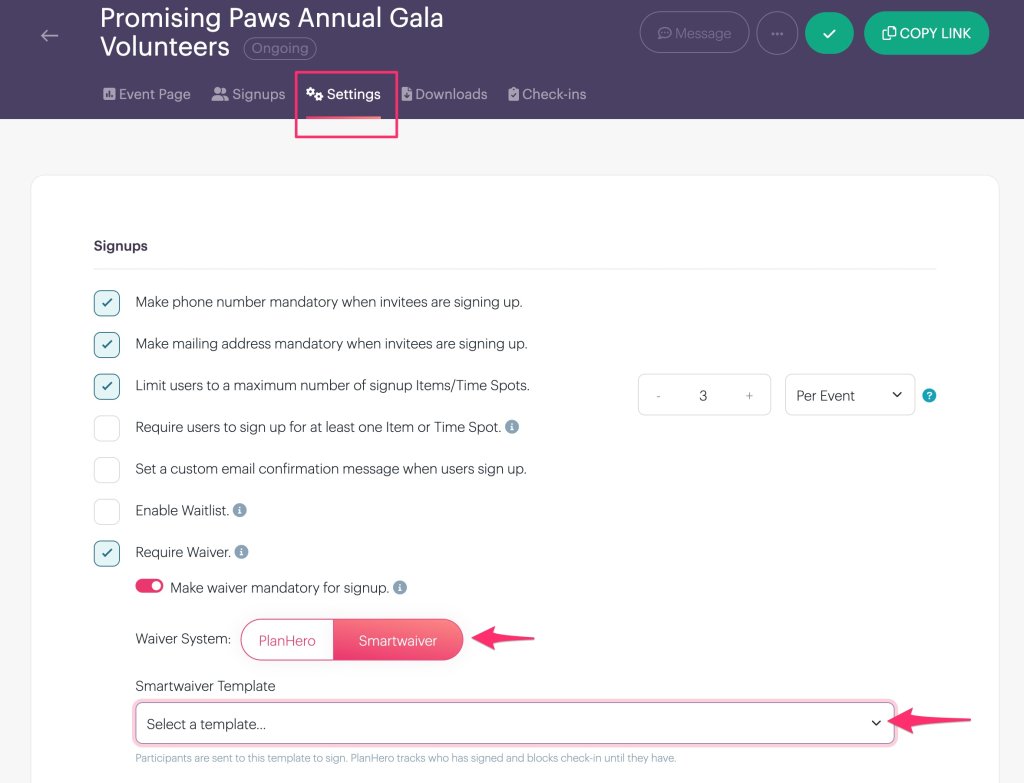
You’ll also see an option labeled:
Make waiver mandatory for signup.
Enable this setting if you want the waiver to be a required part of the signup process.
Step 4B: Select Smartwaiver as Your Waiver System
Under Waiver System, you’ll see two options:
PlanHero | Smartwaiver
Select Smartwaiver.

This tells PlanHero to use a waiver from your connected Smartwaiver account rather than PlanHero’s built-in waiver system.
Step 5B: Choose Your Smartwaiver Template
Once Smartwaiver is selected, a dropdown menu labeled Smartwaiver Template will appear.
Click the dropdown to view the available templates from your connected Smartwaiver account.
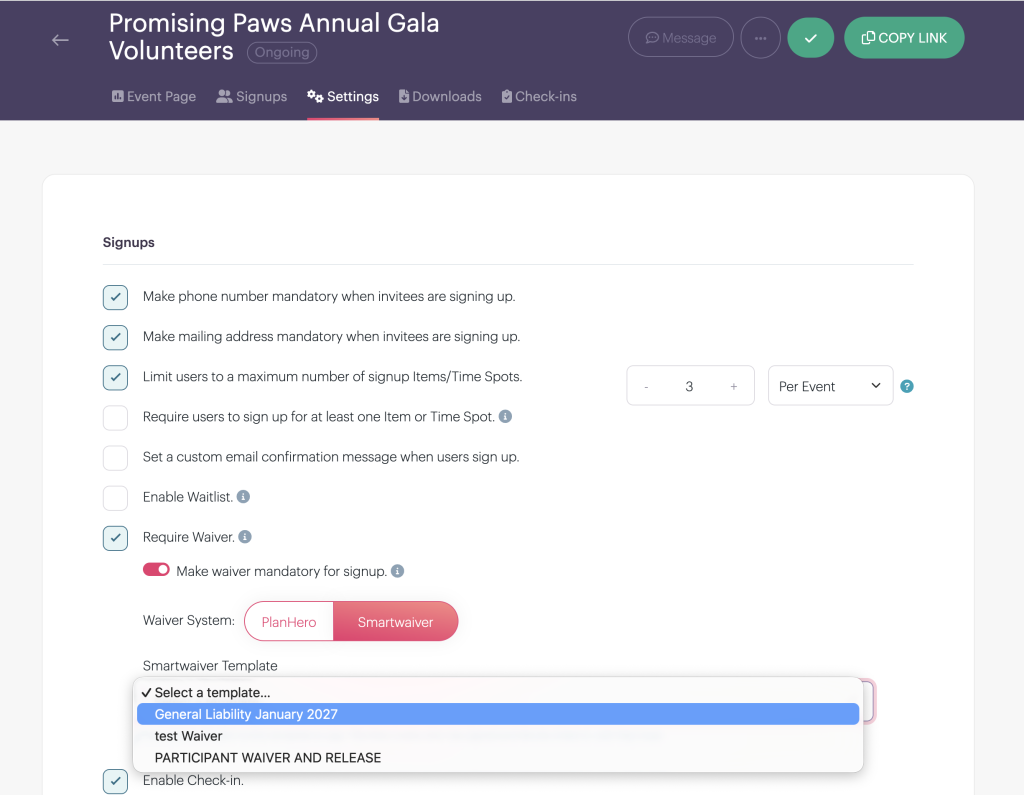
Select the waiver you want participants to complete.
For example, an organization hosting a fundraising gala might select:
General Liability January 2027
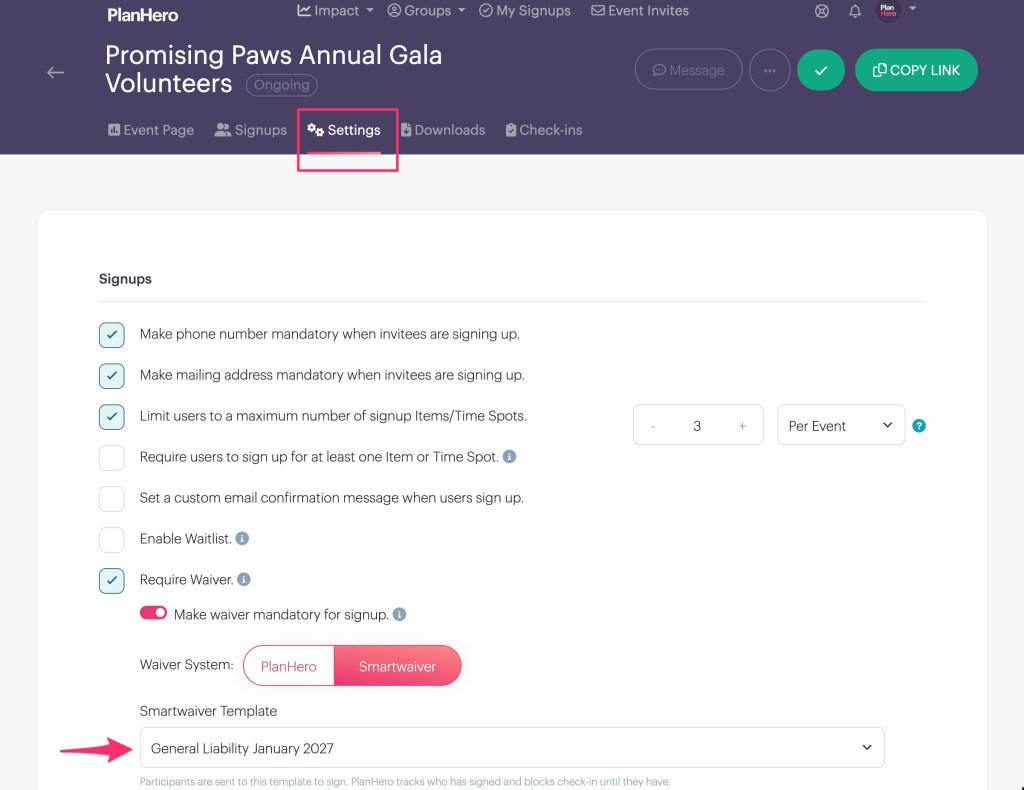
Different Events can use different Smartwaiver templates, allowing organizations to tailor waiver requirements to the activities involved.
Your Event settings will update and save automatically.
What Your Volunteers Will See
When someone signs up for an Event requiring a Smartwaiver, they’ll encounter a Waiver Agreement section on the signup confirmation page.
This section displays the name of the required waiver and a button labeled:
Open and sign the waiver
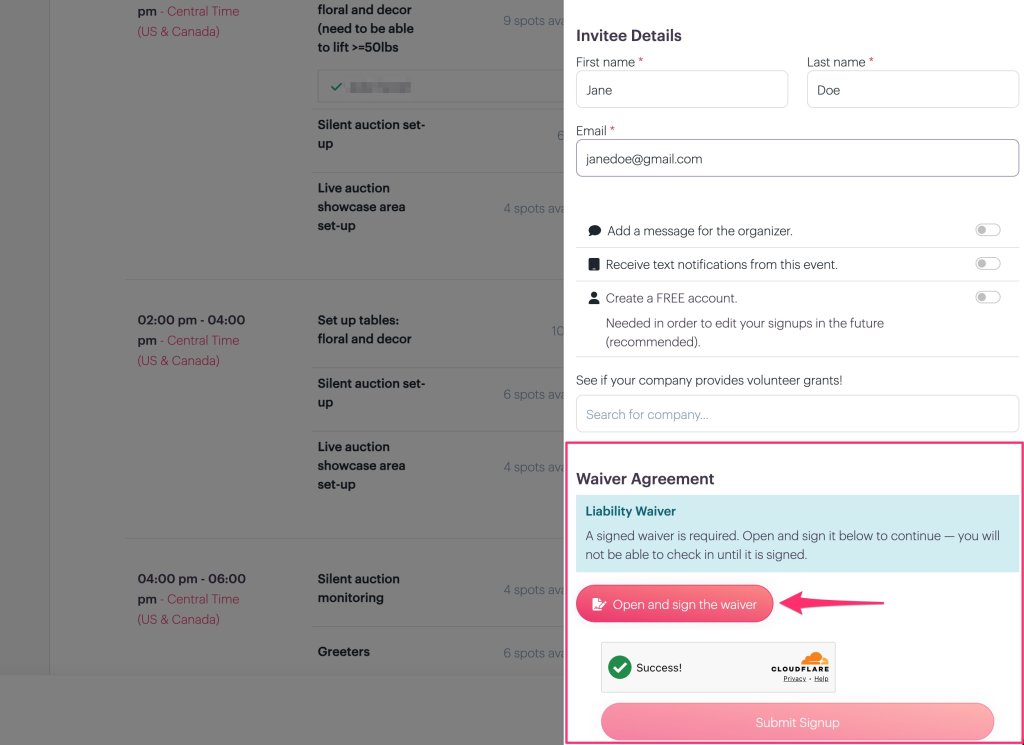
The participant clicks the button to open the Smartwaiver signing process.
Once the waiver has been signed and PlanHero receives confirmation, the participant’s waiver completion status is updated.
Required Waivers and Event Check-In
For Events requiring signed waivers, PlanHero can prevent participants from checking in until their waiver requirement has been satisfied.
This is especially helpful for organizations coordinating large Events.
Imagine managing 100 volunteers at a fundraising gala.
Instead of manually comparing volunteer names against a separate list of signed waivers, organizers can use PlanHero to help ensure that required waivers have been completed before participants check in.
Less paperwork. Less administrative work. More time to focus on your Event.
Why Use Smartwaiver with PlanHero?
1. Connect Member Onboarding and Volunteer Management
Organizations can incorporate Smartwaiver into both Member onboarding and Event signup workflows.
Whether someone is joining your organization or registering to volunteer, PlanHero helps keep waiver requirements connected to the appropriate process.
2. Use Your Existing Smartwaiver Templates
Already using Smartwaiver?
There’s no need to recreate your existing waiver documents in PlanHero.
Simply connect your Smartwaiver account and select the appropriate template for your Member Onboarding Form or Event.
3. Choose Different Waivers for Different Activities
Not every activity requires the same waiver.
A school might use one waiver for general parent volunteering and another for a field trip.
A nonprofit might require one agreement for regular Members and a separate liability waiver for volunteers participating in a special Event.
PlanHero allows organizations to select the appropriate Smartwaiver template for each workflow.
4. Simplify Event Check-In
When an Event requires a signed waiver, PlanHero can prevent participants from checking in until that requirement has been completed.
This helps organizers manage participation requirements and reduces the need to manually verify signed waivers at the Event.
5. Reduce Administrative Work
Managing volunteers and Members already involves plenty of moving parts.
By connecting Smartwaiver to PlanHero, organizations can reduce the need to manually reconcile separate lists of participants and signed waivers.
That means less time managing paperwork and more time supporting the people and programs that matter.
6. Keep Using the Waiver Platform You Prefer
Some organizations prefer PlanHero’s built-in Waivers & Agreements.
Others already have established waiver processes using Smartwaiver.
With the new integration, Impact Plan customers have the flexibility to choose the system that works best for their organization.
Frequently Asked Questions
Do I need a Smartwaiver account?
Yes. You’ll need an active Smartwaiver account to use the integration.
Smartwaiver is a separate service from PlanHero with its own subscription plans and pricing.
Is the Smartwaiver integration included with PlanHero?
The integration is available to organizations using the PlanHero Impact Plan.
Any applicable Smartwaiver subscription fees are separate from your PlanHero subscription.
Can I still use PlanHero’s built-in Waivers & Agreements?
Absolutely!
PlanHero’s existing waiver features remain available.
Organizations can continue using PlanHero’s built-in Waivers & Agreements or choose Smartwaiver for their Member Onboarding Forms and Events.
Can Smartwaiver be used in Member Onboarding Forms?
Yes!
Organizations can select a Smartwaiver template when configuring their Member Onboarding Forms, allowing new Members to complete required digital waivers during onboarding.
Can Smartwaiver be used for Event Signups?
Yes!
Event Organizers can select a Smartwaiver template for an Event and require participants to sign it during the signup process.
Can I use different Smartwaiver templates for different Events?
Yes!
Each Event can be configured with its own Smartwaiver template.
This allows organizations to use different waivers depending on the activities involved.
Can I use Smartwaiver for both Members and non-Members?
Yes!
Smartwaiver can be incorporated into Member Onboarding Forms and Event Signups.
This means organizations can collect required waivers from Members during onboarding while also requiring waivers from non-Members who register for Events.
Can I require a waiver before someone checks in?
Yes.
When a waiver is required, PlanHero can prevent participants from checking in until the waiver has been signed.
What happens if someone doesn’t complete the waiver?
PlanHero tracks whether the required waiver has been completed.
If the waiver remains unsigned, the participant will not be able to check in when the Event’s waiver requirement is enforced.
Do you have a video I can share with my volunteers to explain the Smartwaiver signing process?
Yes, this video shows participants how the process works when signing up for an Event that requires a Smartwaiver signature/acknowledgement.
Does PlanHero replace Smartwaiver?
No.
Smartwaiver continues to provide the digital waiver platform, while PlanHero manages Member onboarding, volunteer signups, Events, and associated waiver completion requirements.
The integration connects the two systems.
Another Way PlanHero Simplifies Volunteer & Member Management
At PlanHero, our goal has always been to make organizing people easier.
From scheduling volunteer shifts and tracking hours to managing Members, background checks, training requirements, and waivers, the Impact Plan brings important administrative tools together.
Our new Smartwaiver integration is another step toward helping organizations manage the details that matter without adding unnecessary work for organizers or participants.
Whether you’re onboarding new Members or coordinating volunteers for your next Event, PlanHero and Smartwaiver work together to make collecting required digital waivers easier.
Ready to Get Started?
If you’re already using the PlanHero Impact Plan, visit Impact → Integrations to connect your Smartwaiver account.
New to PlanHero?
Explore our Impact Plan to discover how PlanHero can simplify volunteer scheduling, Member management, and Event coordination.
Spend less time managing paperwork. More time making an impact.
Disclaimer: PlanHero provides technology and integration tools and does not provide legal advice. Organizations are responsible for determining the appropriateness, validity, and enforceability of their waivers and agreements. Consult qualified legal counsel regarding your organization’s requirements.
