


New in PlanHero: Find a Replacement or Request a Swap
Someone signs up to help. Then life happens.
A meeting gets scheduled. A child gets sick. Travel plans change. Or another date simply works better.
Traditionally, that often means emailing the organizer:
“I can’t make my shift. What should I do?”
The organizer then has to find another volunteer, coordinate a switch, update the signup, and make sure everyone knows what happened.
We thought PlanHero could handle more of that work.
That’s why we’ve added two new participant self-service options: Find a Replacement and Request a Swap.
These features allow participants to solve common scheduling conflicts themselves while PlanHero manages the signup records, notifications, restrictions, and participant privacy behind the scenes.
Find a Replacement
Find a Replacement is designed for a participant who can no longer fulfill a signup, but knows someone who can take their place.
Rather than canceling the signup and hoping the other person grabs it before someone else does, the participant can create a secure replacement link for that specific signup.
How it works
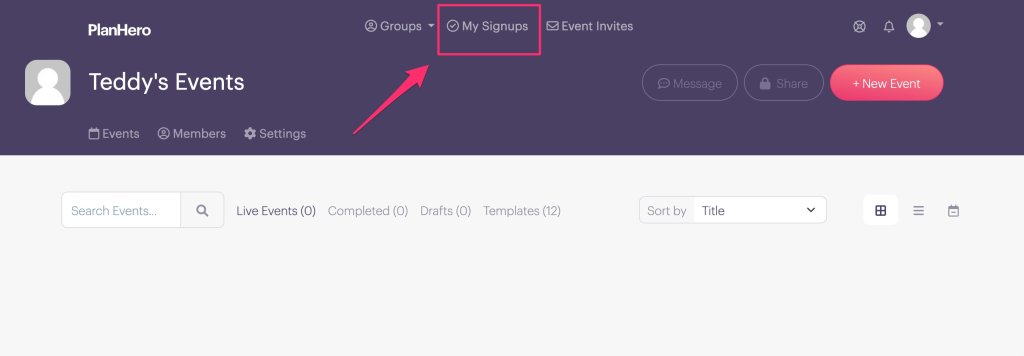
From My Signups, locate the signup you can no longer fulfill and select Find a Replacement.

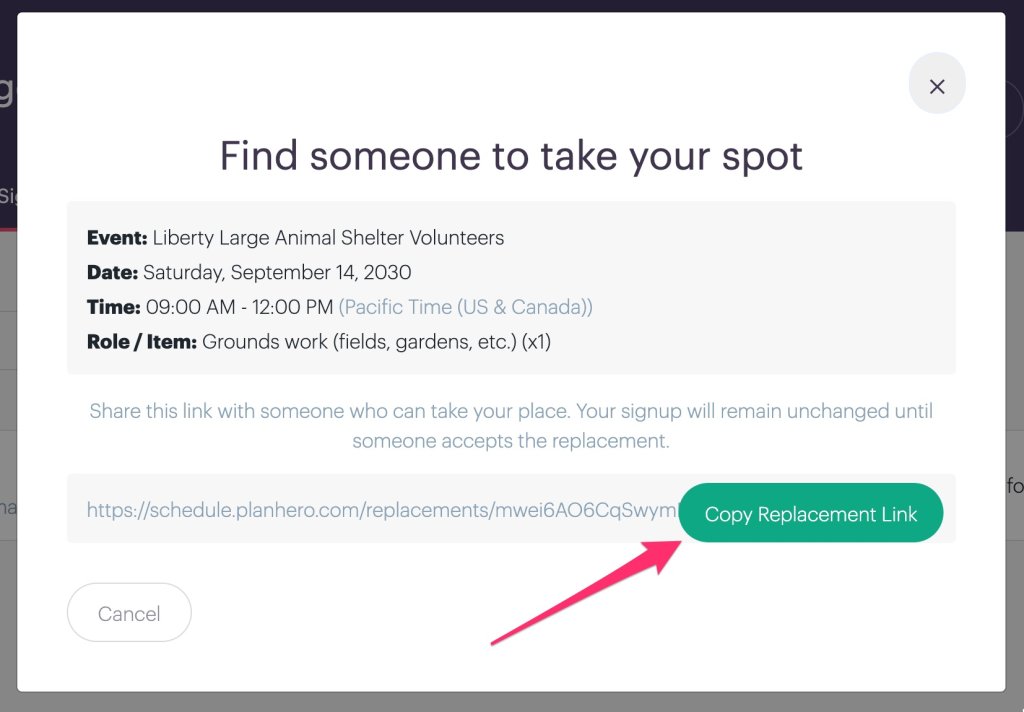
PlanHero will display the details of your existing commitment, including the Event, date, time, and Item or role.
Select Copy Replacement Link and share the link directly with the person who has agreed to take your place.
Your signup stays exactly where it is while you do this. It is not released or made publicly available.
When your replacement opens the link, they can select Take This Spot and complete PlanHero’s normal signup process, including any required contact information, Questions/Forms, waivers, agreements, or other Event requirements.
Only after the replacement successfully completes the signup does PlanHero transfer the spot.
You’ll receive confirmation that someone has taken your spot, and the new participant will receive the normal PlanHero signup confirmation and reminders.
No organizer intervention required.
What if there’s a Waitlist?
PlanHero’s Waitlist gets priority.
If your signup has an active Waitlist, you won’t be able to privately choose a replacement and bypass people who are already waiting for the opportunity.
Instead, you can release your spot and PlanHero will use its normal automated Waitlist process to fill the opening with the next eligible person in line.
Fair is fair.
Request a Swap
Sometimes you don’t need to give up working/helping at an Event altogether. You just need a different signup.
That’s where Request a Swap comes in.
If another eligible participant already holds a signup that would work better for you, PlanHero can help the two of you exchange commitments — without requiring the organizer to coordinate the change.
How it works
From My Signups, select Request a Swap for the signup you’d like to exchange.
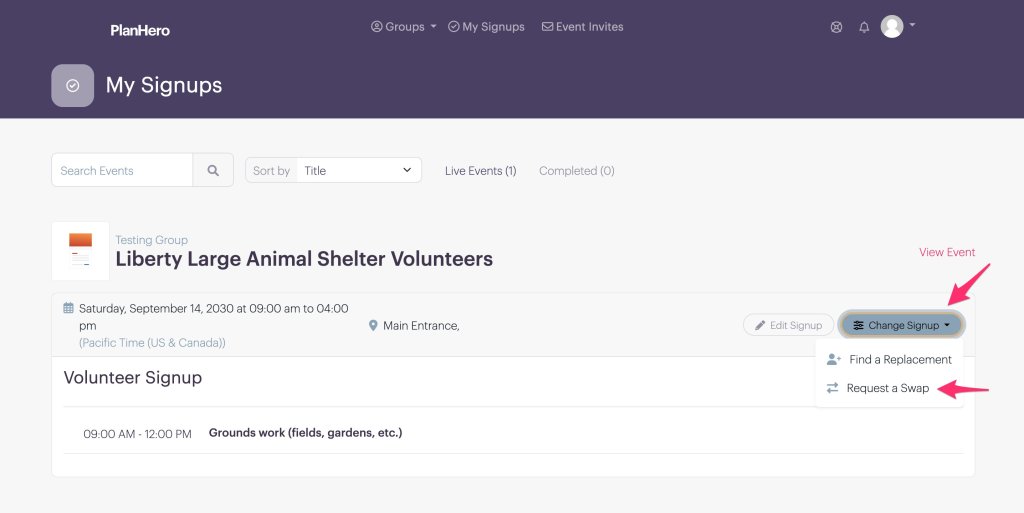
PlanHero will show other eligible occupied signups that could work as alternatives.
For example, perhaps you’re currently signed up for:
Monday, September 7, 9:00pm – 10:30pm — Clean-up Crew
But any of these would work better:
- Friday, September 4, 5:00pm – 6:30pm — Registration Desk
- Friday, September 18, 6:00pm – 8:00pm — Sell Logo Wear
- Friday, September 25, 5:00pm – 6:30pm — Registration Desk
You can select one or more acceptable alternatives and send your swap request.
PlanHero privately contacts the participants holding those signups.
Your existing signup does not change while you’re waiting.
If someone accepts, PlanHero exchanges the two commitments and sends updated confirmations to both participants.
If you sent requests for several possible alternatives, the first accepted swap wins. Once a swap is completed, PlanHero automatically closes the remaining requests. If a second person attempts to accept the swap, they will see a message displayed indicating that the swap has already been made.
If no one accepts, you simply keep your original signup.
Participant Privacy Is Built In
There’s an important detail in the Swap process: PlanHero doesn’t show you who holds the other signup.
You’ll see the opportunity — not the participant.
Likewise, the person receiving your request can see the proposed exchange without needing to know your identity beforehand.
PlanHero handles the connection privately. Organizers still retain access to participant identities and the complete replacement and swap history they need to manage their Event.
A Few Important Guardrails
Not every signup can necessarily be replaced or swapped, so we’ve added some guardrails for volunteer shift replacement.
PlanHero respects the same Event restrictions that apply to normal signup changes and cancellations. Depending on the circumstances, options may not be available for signups involving things such as payments, incompatible requirements, active Waitlists, locked Events, or signup deadlines that have already passed.
And if you simply want to move to another open opportunity, you don’t need either of these features. Sign up for the new available opportunity and delete your old signup, just as you can today.
Find a Replacement is for someone else taking your spot.
Request a Swap is for exchanging your signup with another participant who already has a spot.
Less Coordinating. More Helping.
Volunteer scheduling will always involve a certain amount of unpredictability. People’s schedules change.
But every change shouldn’t require another email to the organizer.
With Find a Replacement and Request a Swap, participants have more control over the commitments they’ve made, organizers have fewer scheduling headaches, and PlanHero keeps everything organized behind the scenes.
Because sometimes the best volunteer-management feature is the one that means the organizer doesn’t have to manage anything at all.
Shift Swapping FAQs
What is volunteer shift swapping?
Volunteer shift swapping allows two participants to exchange existing signup commitments when another date, time, or opportunity works better for both of them.
Can a PlanHero participant find someone to take their signup?
Yes. With Find a Replacement, an eligible participant can generate a secure link and share it with someone who can take their exact signup. The original signup remains in place until the replacement successfully completes the signup process.
Can volunteers swap shifts in PlanHero without contacting the organizer?
Yes. When Request a Swap is available for an Event, participants can request to exchange eligible signups directly. PlanHero manages the request, acceptance, signup changes, and notifications without requiring normal organizer approval.
What happens if a volunteer signup has a Waitlist?
PlanHero’s Waitlist takes priority. A participant cannot use Find a Replacement to privately give the spot to someone else ahead of people already waiting. If the spot is released, PlanHero’s automated Waitlist process fills it with the next eligible participant.
Does PlanHero show volunteers who they are requesting a swap with?
No. PlanHero shows the eligible signup opportunity rather than the identity of the participant holding it. Organizers continue to have access to participant information and replacement and swap history.
