


Introducing the PlanHero + Givebutter Integration
Turn volunteers into relationships—and keep your fundraising data connected.
The PlanHero + Givebutter integration is available exclusively with the PlanHero Impact Plan and automatically sends key volunteer, event, and payment information from PlanHero to Givebutter.
Bring Volunteer Engagement and Donor Cultivation Together
The people who volunteer for your organization are often among your strongest supporters—and may become future donors. With the PlanHero + Givebutter integration, you can keep those relationships connected without manually moving information between systems.
Once the integration is connected, PlanHero can automatically sync Group Members and Contacts to Givebutter Contacts, published PlanHero Events to Givebutter Campaigns, and successful payments or donations collected through a PlanHero Collect Money List to Givebutter Transactions.
There is no manual sync button to remember. The data flow happens automatically in the background.
What the Integration Syncs
Group Members → Givebutter Contacts
Whenever a Group Member or Contact is added or updated in PlanHero, their basic contact information is automatically sent to your Givebutter Contacts list.
What syncs:
- First Name
- Last Name
- Phone Number
Published Events → Givebutter Campaigns
When you create and Publish an Event in PlanHero, the Event is automatically created as a new Campaign in Givebutter.
What syncs:
- Event Title
- Event Description
Important: Draft Events remain in PlanHero and are not sent to Givebutter until they are published.
Collect Money → Givebutter Transactions
If you set up a Collect Money List on a PlanHero Event, a successful payment or donation made through your PlanHero signup form is recorded as a Transaction in Givebutter.
What syncs:
- Donor contact information
- Total amount paid
- Date of the transaction
PlanHero securely processes the actual credit-card payment through Stripe. The payment is then logged in Givebutter as an “offline/other” payment method, allowing the donor’s giving history to remain together in Givebutter.
How to Connect Givebutter to PlanHero
Getting connected requires just two quick setup steps. After that, PlanHero handles the syncing automatically.
Step 1: Generate Your Givebutter API Key
Before connecting PlanHero, you’ll need to create a secure API key from your Givebutter dashboard.
- Log in to your Givebutter account.
- In the left-hand menu, navigate to Settings.
- Click on Developers.
- Under the API section (on the left), click + New API Key.
- Give the API key a recognizable name, such as “PlanHero Integration.”
- Click the Create button at the bottom.
- Copy the generated API key to your clipboard.
Step 2: Connect Givebutter in PlanHero
Now you’re ready to bring that API key into PlanHero.
1. Log in to your PlanHero account.
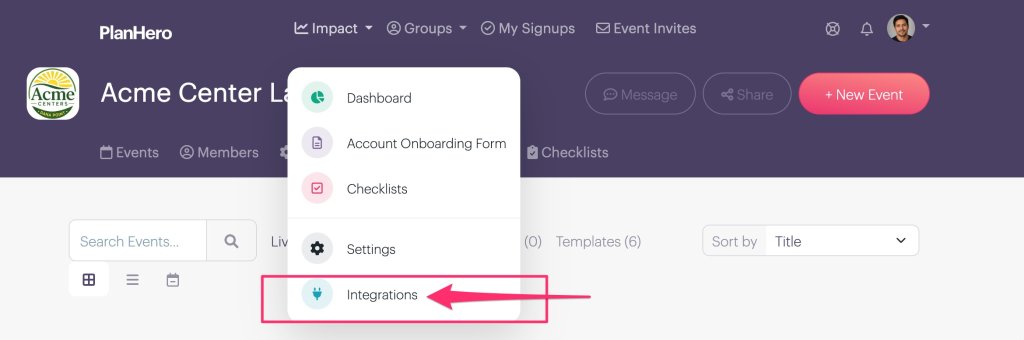
2. Navigate to the Impact menu.

3. Select Integrations.
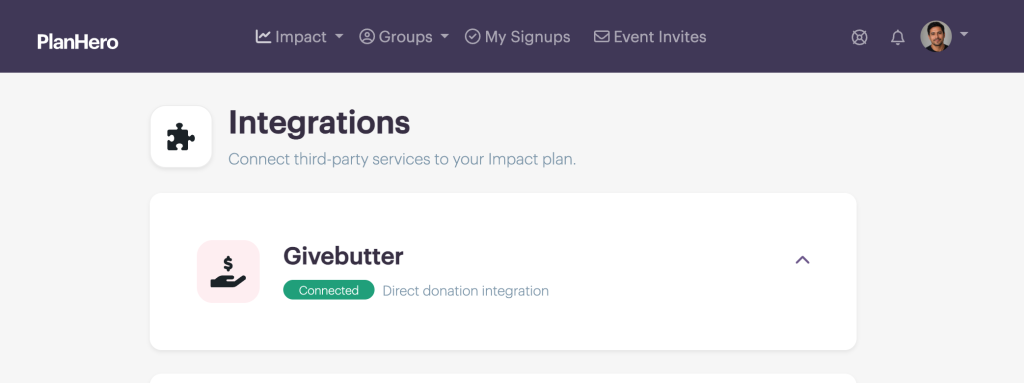
4. Find the Givebutter integration and paste the API key you copied from Givebutter into the provided field.
5. Click the Connect button.

That’s it! PlanHero will automatically verify the connection.
Step 3: Let PlanHero Handle the Sync
Once connected, you don’t need to manually trigger a sync.
As you add or update people, publish Events, and collect successful payments or donations through eligible PlanHero Events, the corresponding information is sent to Givebutter automatically.
Why This Matters for Donor Cultivation
The real value of the integration is what happens after someone volunteers, attends, pays, or donates.
Givebutter users can see the contact information for people who engaged with their PlanHero Events and use that information to continue building those relationships as potential future donors.
For organizations using PlanHero to organize volunteers and Givebutter to cultivate supporters and donors, the integration helps connect two important parts of the relationship: participation and giving.
A Few Things to Remember
- The Givebutter integration is available exclusively to PlanHero Impact Plan subscribers.
- Only published PlanHero Events are sent to Givebutter. Draft Events remain in PlanHero until they’re published.
- The integration runs automatically after it is connected.
- Stripe processes the actual credit-card transaction; PlanHero logs the payment information in Givebutter.
Givebutter is a trademark of Givebutter, Inc. PlanHero is an independent service and is not affiliated with or endorsed by Givebutter, Inc.
