


Sometimes you know exactly what you need to tell your volunteers, members, or participants — you just don’t want to have to remember to send it later.
PlanHero now lets you schedule messages in advance, so you can write your message when it’s convenient and choose the date and time you want PlanHero to send it.
Schedule Messages are available at three levels in PlanHero:
- Event Messages can be scheduled on every PlanHero plan, including Free.
- Group Messages can be scheduled on paid PlanHero plans.
- Account Messages can be scheduled with the Impact Plan.
That means you can schedule anything from a reminder or thank-you note for participants in a single Event to an organization-wide announcement — and let PlanHero take care of sending it at the right time.
Why Schedule a Message?
Organizers already have enough things to remember.
Maybe you’re creating an Event on Monday but want a message to go out Friday afternoon. Perhaps you want to thank everyone after a fundraiser, remind volunteers about an upcoming shift, or send an announcement to members of several Groups at once.
Instead of adding another reminder to your own calendar, you can prepare the message now and tell PlanHero when to send it.
And because PlanHero is ad-free, the message your recipients receive is focused on your organization and your message — not an advertiser.
Schedule an Event Message
Event-level Schedule Messages are available on all PlanHero subscriptions, including Free.
Open the Messages area for your Event and create your message as usual.
Choose your recipients, enter your subject, and compose your message. Depending on the communication options available to you, you can also select whether the message will be sent by email, text, or both.
When you’re ready to schedule it:
1. Check Schedule for later.

2. Click Select Date and Time.
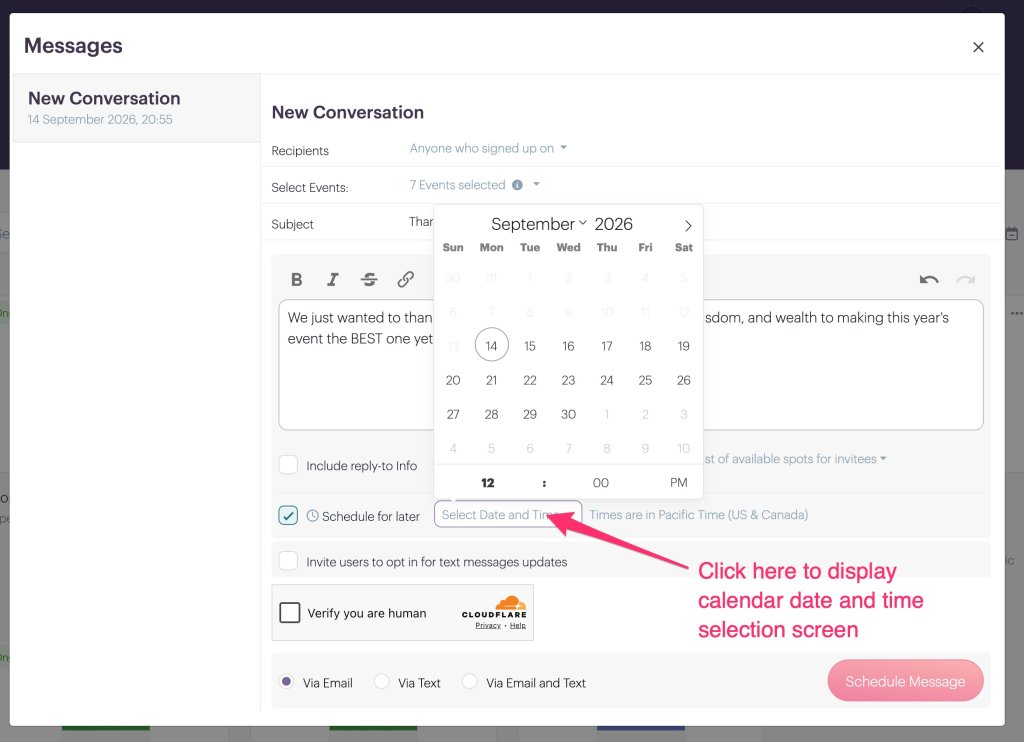
3. Choose the date and time you want your message sent. PlanHero displays the applicable time zone next to the scheduling field.
4. Complete the human verification.
5. Click Schedule Message.

That’s it. You don’t need to return to PlanHero at the scheduled time — PlanHero will send the message for you.
Schedule a Group Message
If you’re on a paid PlanHero plan, you can also schedule messages at the Group level.
This is particularly useful when your message isn’t tied to one specific Event.
For example, you might want to send a message to your Group about an upcoming meeting, a new volunteer opportunity, a deadline, or simply information everyone in the Group needs to know.
From your Group’s messaging area, create your message and select the appropriate recipients. Then check Schedule for later, choose your desired date and time, and schedule the message just as you would an Event message.
Schedule an Account Message with the Impact Plan
Organizations using the PlanHero Impact Plan can take scheduled communication one step further by scheduling messages at the Account level.
Account Messages are ideal when you need to communicate across your organization rather than within one Event or Group.
Create your Account message, select the appropriate audience, check Schedule for later, and choose when PlanHero should send it.
This gives Impact organizations a simple way to prepare broader communications ahead of time without requiring someone to log back in at exactly the right moment to send them.
Need to Change a Scheduled Message?
No problem.
Once you’ve scheduled a message, it appears in the conversation where you can see the date and time it is scheduled to be sent.
Until it is sent, you can Edit or Cancel it.
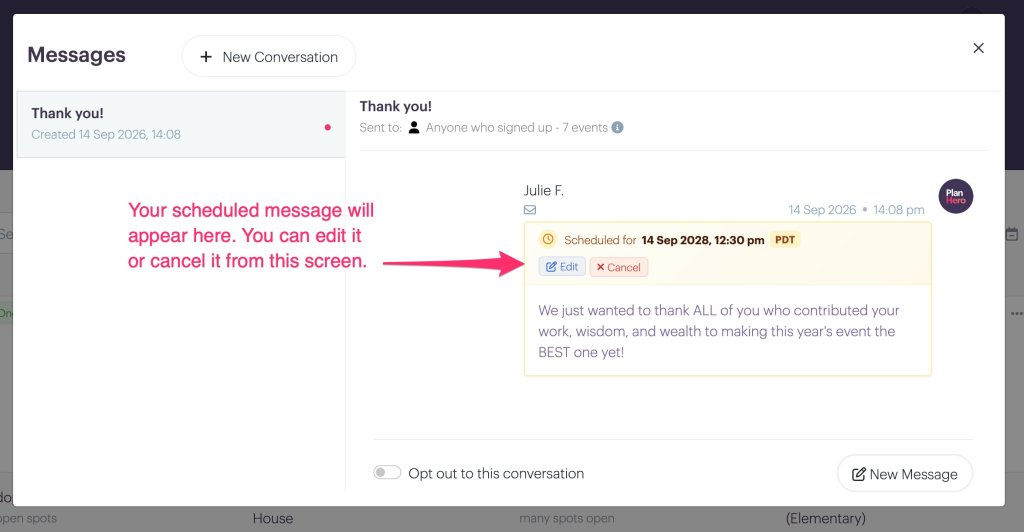
If you edit the scheduled message, you can change its scheduled date or time as well as the message itself. Just be sure to click Save Changes when you’re finished.

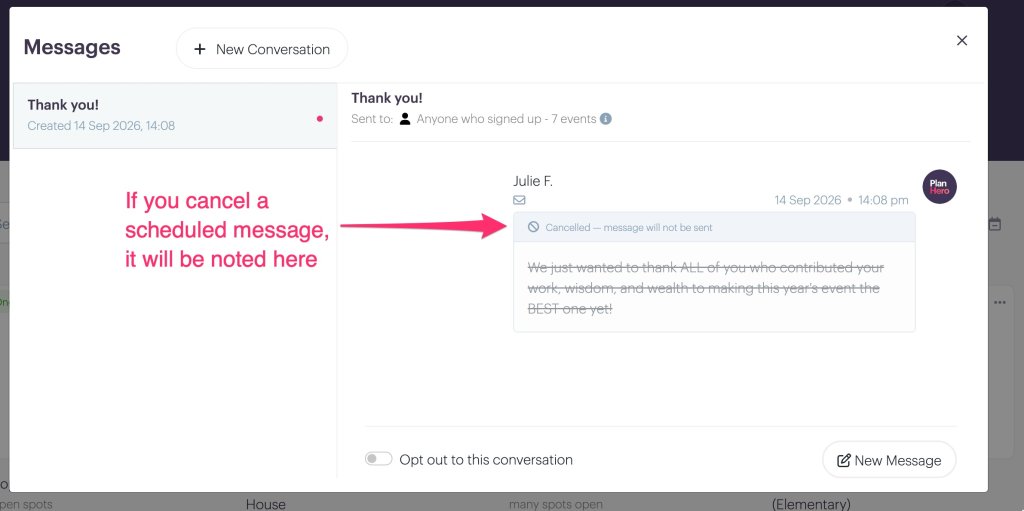
If you cancel the message, PlanHero will mark it as canceled and the message will not be sent.
Write It Now. Send It Later.
Schedule Messages are one of those small features that can make a surprisingly big difference for busy organizers.
Write the thank-you message while the event is still fresh in your mind. Prepare next week’s volunteer reminder today. Schedule an organization-wide announcement when you have time to think about what you actually want to say.
Then get back to the work that matters.
PlanHero will take care of the timing.
FAQs
Can I schedule messages in PlanHero?
Yes. PlanHero lets you schedule messages to be sent at a future date and time. Event-level scheduled messages are available on all plans, including Free; Group-level scheduling is available on paid plans; and Account-level scheduling is available with the Impact Plan.
