


Whether you’re welcoming new volunteers, onboarding employees, registering youth participants, or coordinating community events, collecting signed waivers and agreements is often one of the most important—and time-consuming—parts of the process.
We’re excited to introduce Waivers & Agreements, a new feature available exclusively in the PlanHero Impact Plan.
With this feature, you can securely collect electronic signatures in one of two ways:
- As part of your Member Onboarding Form
- As a requirement for a specific Event or Signup
Depending on your organization’s needs, you may use one method—or both.
* – PlanHero is not offering nor providing legal advice in this post/article. You should always seek professional legal counsel for matters concerning legal agreements and their validity.
Two Ways to Collect Electronic Waivers
Every organization works a little differently, so PlanHero gives you flexibility.
Option 1: Include a Waiver or Agreement During Member Onboarding
If every new member, volunteer, employee, or participant needs to sign the same agreement before joining your organization, the onboarding form is the ideal solution.
Examples include:
- Liability waivers
- Volunteer agreements
- Codes of conduct
- Parent consent forms
- Confidentiality agreements
- Media release forms
Once enabled, every new member can review and electronically sign the agreement while completing the onboarding process.
You can choose whether the waiver applies:
- To all Groups in your organization, or
- Only to specific Groups.
This makes it easy to support organizations with multiple campuses, chapters, schools, departments, or locations that may each require different documents.
Option 2: Require a Waiver for a Specific Event
Sometimes a waiver is only needed for certain activities.
For example:
- Food distributions
- Sports leagues
- Field trips
- Summer camps
- Volunteer work days
- Community festivals
- Fundraising events
For these situations, simply add a waiver directly to the Event’s settings.

Participants will be required to review and electronically sign the agreement before completing their signup.
Upload a PDF or Paste Your Agreement
PlanHero makes setup simple.
For both onboarding forms and event waivers, you can choose either option:
- Upload your existing PDF waiver, or
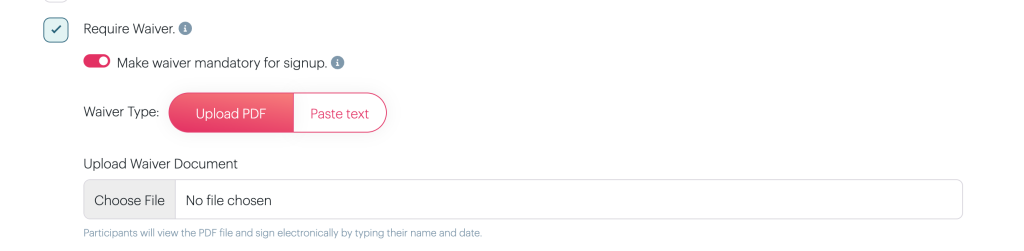
- Paste the agreement text directly into PlanHero.
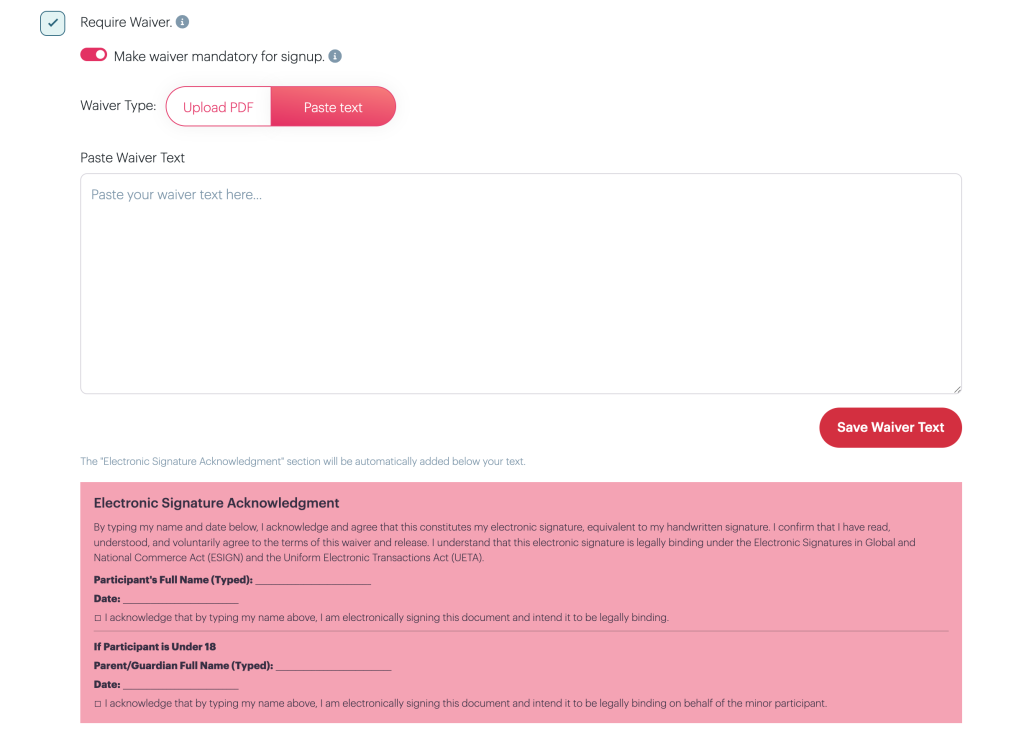
Choose whichever works best for your organization.
Electronic Signature Acknowledgement
When participants reach the waiver, they’ll be able to:
- Read the agreement
- Download the document (when applicable)
- Enter their name
- Electronically sign
- Date their signature
- Submit the completed form
Example of an uploaded PDF EVENT WAIVER acceptance at bottom of Event Signup Confirmation page:

Example of an uploaded PDF WAIVER acceptance in a Member ONBOARDING FORM page (Impact Plan only):
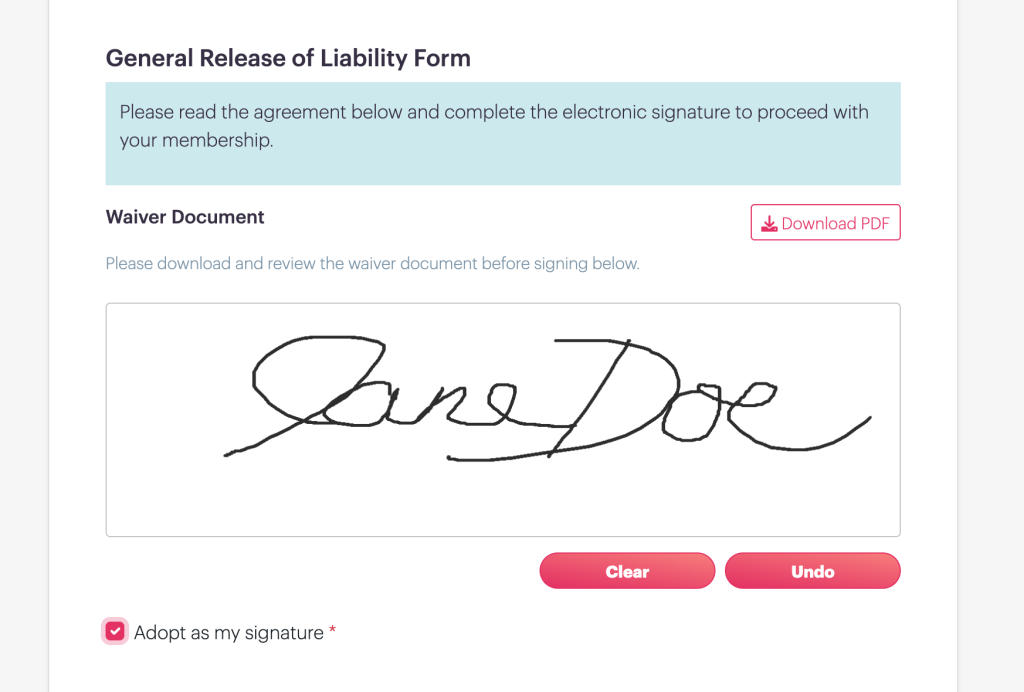
This creates a clear record of the participant’s acknowledgement before they become a member or complete their event registration.
Easily See Who Has Signed
After someone signs a waiver, PlanHero makes it easy for organizers to see their status.
Within your dashboard you’ll find:
- A visual indicator showing the participant has signed.
- The date and time the agreement was signed.
- The title of the signed waiver.
- The ability to view the completed waiver from the participant’s record.
If the waiver was completed during onboarding in our PlanHero Impact Plan, you’ll also see the waiver status while reviewing and approving pending members.
Example of Waiver Agreement signed via a Member Onboarding Form with our PlanHero Impact Plan:
As viewed in the Member Roster

As viewed in a Member Profile

Example of Waiver Agreement signed on final EVENT Signup Confirmation page:

After clicking the View Waiver button above in the Member Profile

Download Waiver Information with Your Event Reports
Need documentation for your records?
When you download your Event Signup CSV, PlanHero includes waiver information such as:
- Participant name
- Waiver title
- Date signed
- Exact time signed (down to the second)
This makes it easy to maintain accurate records for insurance requirements, audits, or internal documentation.
Perfect for Many Types of Organizations
The Waivers & Agreements feature is ideal for organizations such as:
- Nonprofits
- Volunteer organizations
- Schools
- Churches
- Sports programs
- Community organizations
- Healthcare outreach programs
- Youth organizations
Whether you’re collecting a single organization-wide agreement or event-specific waivers throughout the year, PlanHero helps keep everything organized in one place.
Available Exclusively in the Impact Plan
Waivers & Agreements are included with the PlanHero Impact Plan, giving organizations another powerful tool for managing volunteers, members, employees, participants, and other groups from a single platform.
Combined with features like Member Management, Checklists, QR Check-In, Volunteer Hour Tracking, Background Check Status, and Group Management, PlanHero continues to simplify the administrative work that keeps organizations running smoothly.
Start Using Waivers Today
If you’re already using the Impact Plan, you can begin creating waivers immediately through either your Member Onboarding Form or your Event Settings.
Not using the Impact Plan yet?
Explore everything the Impact Plan has to offer and see how PlanHero can help streamline volunteer management, onboarding, compliance, and event coordination—so you can spend more time focusing on your mission and less time managing paperwork.
* – PlanHero is not offering nor providing legal advice in this post/article. You should always seek professional legal counsel for matters concerning legal agreements and their validity.
